
What is a pixel?
Right now, as you read these words, you're looking at millions of tiny glowing dots arranged in a grid. Each dot is called a pixel, and they're the building blocks of everything you see on a screen — text, photos, videos, games, and more.
The word "pixel"
The word "pixel" comes from combining "picture" and "element" — a picture element. It was first used in the 1960s by researchers working on digital imaging.
A pixel is the smallest individual unit of a digital image or display. Think of it like a single tile in a mosaic — up close, it's just a small colored square. But when you step back and see thousands or millions of them together, they form a complete image.
What does a pixel look like?
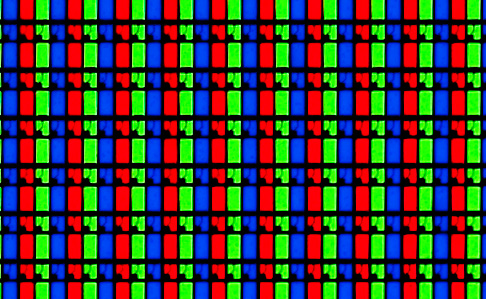
If you could zoom in very closely on your screen (with a magnifying glass or a macro camera lens), you'd see that each pixel is actually made up of three tiny colored lights:
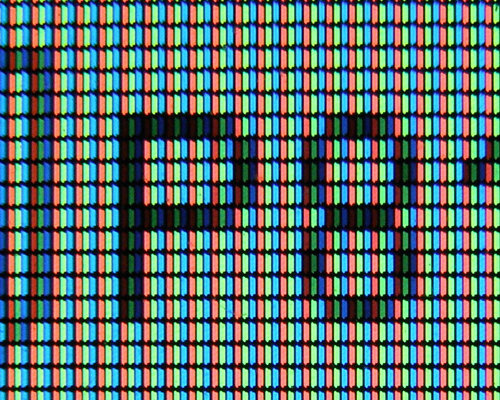
- Red
- Green
- Blue
These are called sub-pixels. By adjusting the brightness of each sub-pixel, the screen can produce any color you can imagine. This is called the RGB color model.
For example:
- Red at full brightness + Green at full brightness + Blue off = Yellow
- All three at full brightness = White
- All three off = Black
- Red at full + Blue at full + Green off = Magenta
This might seem surprising — you might have learned in art class that red and blue make purple, not magenta, and that the primary colors are red, yellow, and blue. That's true for mixing paint (subtractive color mixing), but screens use additive color mixing with light, which works differently.
How many pixels does your screen have?
Screen resolution tells you how many pixels your display contains. Common resolutions:
| Resolution | Pixels wide | Pixels tall | Total pixels |
|---|---|---|---|
| HD (720p) | 1,280 | 720 | 921,600 |
| Full HD (1080p) | 1,920 | 1,080 | 2,073,600 |
| 2K (1440p) | 2,560 | 1,440 | 3,686,400 |
| 4K (2160p) | 3,840 | 2,160 | 8,294,400 |
| 8K (4320p) | 7,680 | 4,320 | 33,177,600 |
A Full HD screen has over 2 million pixels, each displaying its own color, all updating many times per second. A 4K screen has over 8 million pixels! And an 8K TV has more than 33 million pixels.
How computers store images as numbers
Since each pixel is just a combination of red, green, and blue, a computer can represent any pixel as three numbers — one for each color channel. Each number typically ranges from 0 (none of that color) to 255 (maximum brightness of that color).
For example:
| Color | Red | Green | Blue |
|---|---|---|---|
| Pure red | 255 | 0 | 0 |
| Pure green | 0 | 255 | 0 |
| Pure blue | 0 | 0 | 255 |
| White | 255 | 255 | 255 |
| Black | 0 | 0 | 0 |
| Yellow | 255 | 255 | 0 |
| Orange | 255 | 165 | 0 |
| Sky blue | 135 | 206 | 235 |
So a digital image is really just a giant grid of numbers. A 1920x1080 photo contains 2,073,600 pixels, each with three color values — that's 6,220,800 numbers that together form a single image!
Try it on codeguppy.com
On codeguppy.com, you draw on an 800x600 canvas — that's 480,000 pixels. Every time you call a drawing function, you're really telling the computer which pixels to light up and what color to make them.
Here's a fun program that draws individual pixels in random colors:
noStroke();

for (let x = 0; x < 800; x += 4)
{
    for (let y = 0; y < 600; y += 4)
    {
        let r = random(0, 255);
        let g = random(0, 255);
        let b = random(0, 255);

        fill(r, g, b);
        rect(x, y, 4, 4);
    }
}
This creates a colorful static pattern — every 4x4 block is a random color. You're painting 30,000 colored blocks, each one controlling a small group of pixels!
And here's a program that shows how different amounts of red, green, and blue create different colors:
background(30);
noStroke();

for (let x = 0; x < 800; x++)
{
    let r = map(x, 0, 800, 0, 255);

    fill(r, 0, 0);
    rect(x, 50, 1, 100);

    fill(0, r, 0);
    rect(x, 200, 1, 100);

    fill(0, 0, r);
    rect(x, 350, 1, 100);
}

fill("white");
textSize(18);
text("Red", 10, 42);
text("Green", 10, 192);
text("Blue", 10, 342);
text("0", 10, 170);
text("255", 765, 170);
Pixel density: why some screens look sharper
Have you noticed that your phone screen often looks sharper than a TV, even though the TV has more pixels? That's because of pixel density — how many pixels are packed into each inch of screen.
Pixel density is measured in PPI (pixels per inch):
- A typical desktop monitor: ~100 PPI
- A typical smartphone: ~400+ PPI
- A retina display MacBook: ~220 PPI
When pixels are packed closer together, they're too small for your eye to distinguish individually, so the image looks smooth and sharp. When pixels are spread farther apart (like on a large TV viewed up close), you can start to see the individual dots.
Pixels in the real world
- A typical smartphone photo is about 12 megapixels (12 million pixels).
- A high-end digital camera can capture 50+ megapixels.
- The first digital camera, built by Kodak in 1975, captured images at just 0.01 megapixels (10,000 pixels). It took 23 seconds to save a single black-and-white photo.
- The total number of pixels across all screens in the world at any given moment is estimated at several quadrillion.
The bottom line
Everything you see on a screen — every photo, every word, every game — is made of pixels. And every pixel is just three numbers: how much red, how much green, and how much blue. The magic of digital imaging is that millions of these simple, tiny colored dots combine to create the rich visual world we see on our screens every day.
The next time you draw something on codeguppy.com, remember: you're really just telling the computer which of those 480,000 tiny dots to light up. Pretty cool, right?
Read more blog articles Browse JavaScript projectsAbout codeguppy
CodeGuppy is a FREE coding platform for schools and independent learners. If you don't have yet an account with codeguppy.com, you can start by visiting the registration page and sign-up for a free account. Registered users can access tons of fun projects!
Follow @codeguppy on Twitter for coding tips and news about codeguppy platform. For more information, please feel free to contact us.